Building something for myself with Claude Opus 5.5
I wanted somewhere to practise Chinese handwriting again. Building 写写 with Claude made me feel more able to create the small, particular tools I wish existed.
Writing Chinese has always been difficult for me, even though I did relatively well in Chinese exams at school. I can speak it, but reading takes more effort, and writing is where I really struggle.
My parents are from China, and I have a very Chinese-sounding, two-word full name: “Lin Jin”. You might expect my Chinese to be better than it is, and so did many people I met. I wanted somewhere to practise, starting again with characters I learnt in primary school. That was how 写写 Xiě Xiě began.
With models like Claude Opus 5.5 and GPT 6 Astra, I feel that working with AI has changed again. I can start with something I want to make and talk it through as we go, while the model takes on more of the work of building, testing, and checking the result. Building 写写 with Opus 5.5 made the small, niche tools I wish existed feel much more within reach, perhaps even for people without a technical background.
It started with wanting somewhere to practise
My first prompt in Claude Artifacts began:
I want a web app (for learning, a bit light, a bit whimsical, a bit fun) for practicing how to write Chinese characters.
It was a fairly simple request. I explained that I was a Singaporean who had learnt Chinese when I was younger but had forgotten how to write many characters. I wanted an app that felt light, whimsical, and fun. It would show an English meaning and pinyin, and I would try to write the character from memory.
I suggested using Singapore school levels as a starting point. For storage, I asked for progress to be saved in the browser first, with Firebase login and storage to come later.
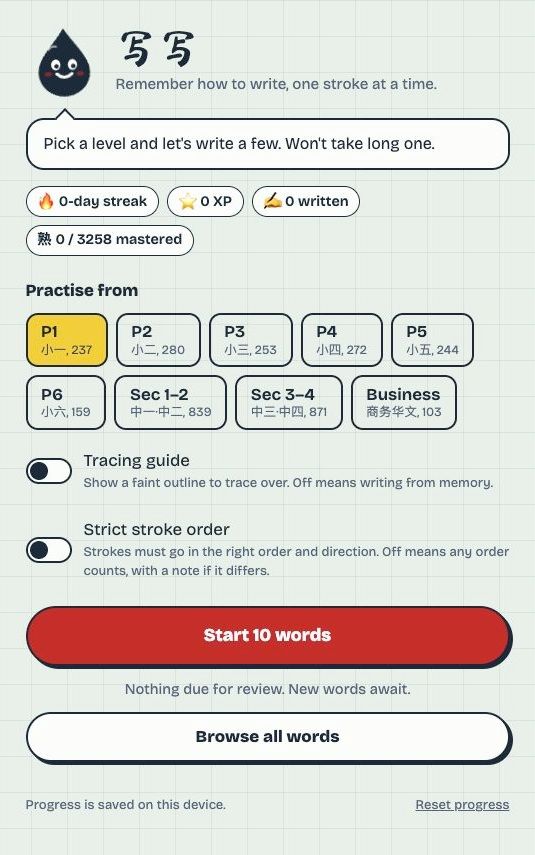
What surprised me was how quickly Claude found and assembled the resources it needed. I had described what I wanted to do, without telling it which handwriting library to use or how to put the app together. It came back with something I could actually play with: a handwriting grid, stroke checking, hints, animations, grading, and spaced review. It also gave the app an ink-drop mascot called Momo.
The word list was one of the first things I asked about. Claude said its initial selection was its own, rather than an official MOE list, so I asked it to research more grounded sources before changing the code. Very quickly, it found sources for the official MOE 欢乐伙伴 character lists, along with China's list of 3,500 everyday characters. We used these to expand the coverage, with the MOE lists as the basis for primary levels and the remaining characters from China's list grouped by frequency for secondary levels.
Then I sent the link to other people
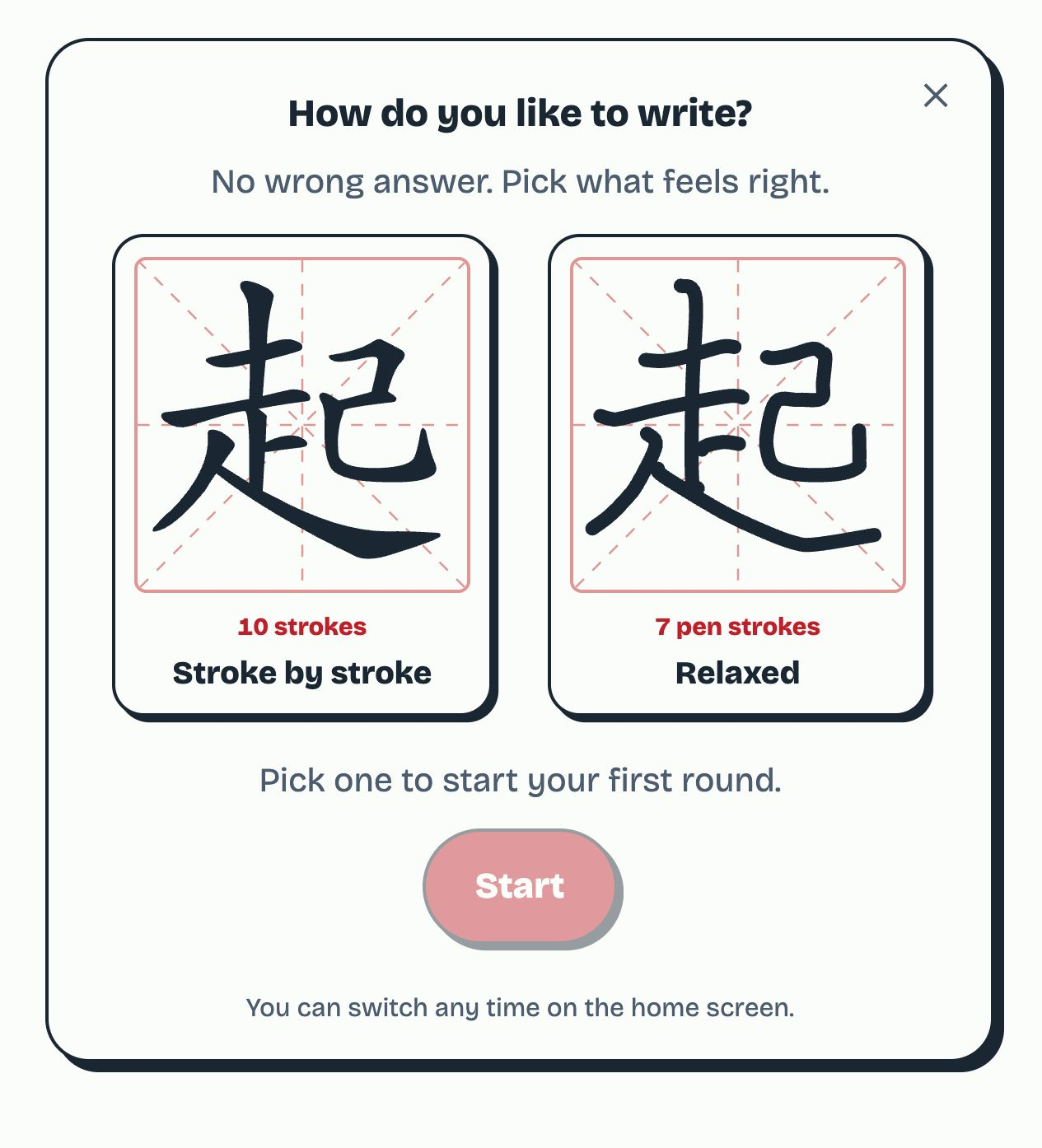
The prototype Claude created in Artifacts used Hanzi Writer, an open-source JavaScript library that animates Chinese characters and checks each stroke as people practise writing them. It was excellent at guiding someone through a character. The app expected users to write one stroke at a time, in textbook order.
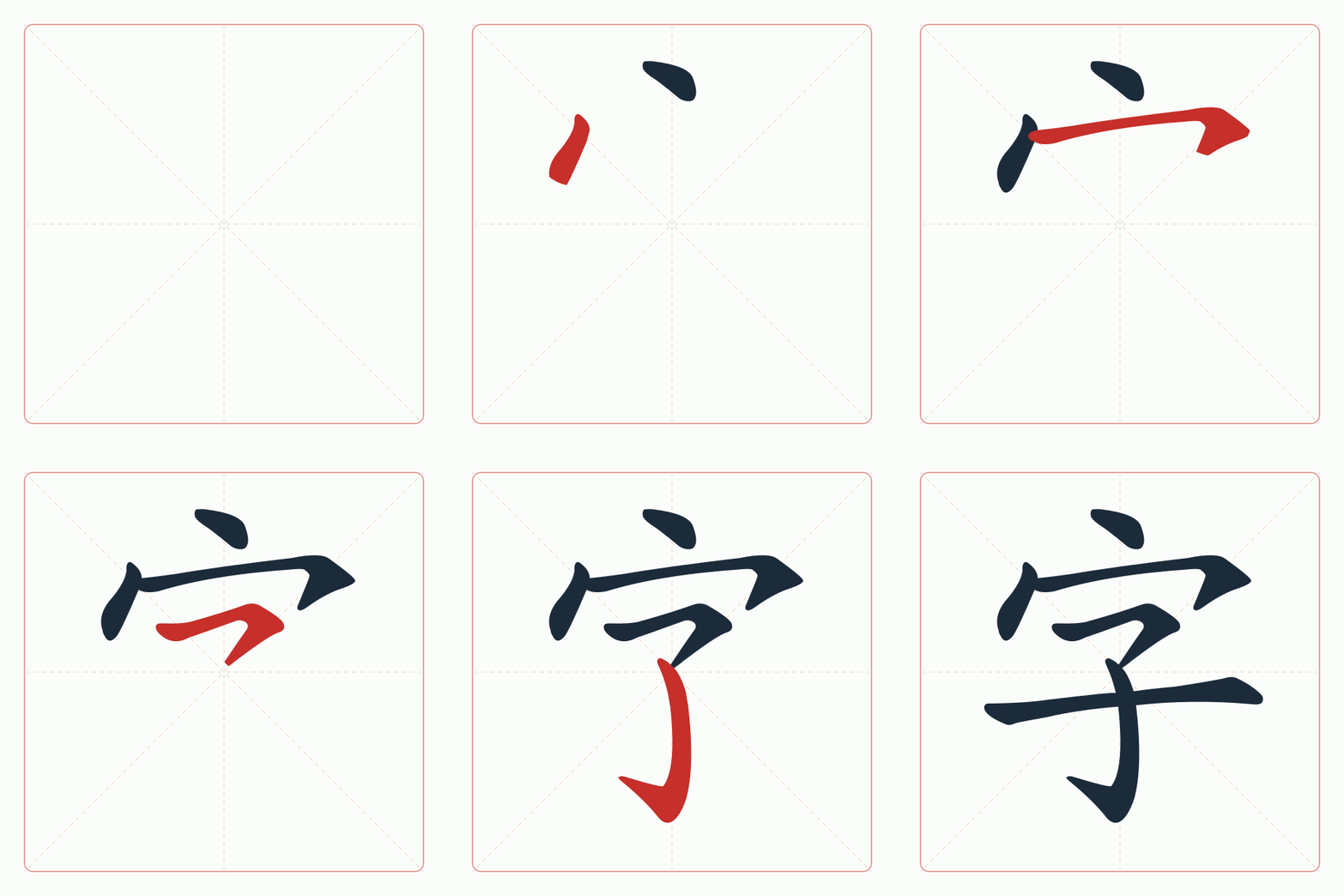
I then shared the Artifact link with others for guerrilla testing. After a couple of rounds, I realised that many people wanted to write the word quickly. They were less concerned with textbook stroke order: they joined strokes together, wrote in a different sequence, and expected a recognisable character to count. Checking each stroke got in the way of how they wanted to practise.
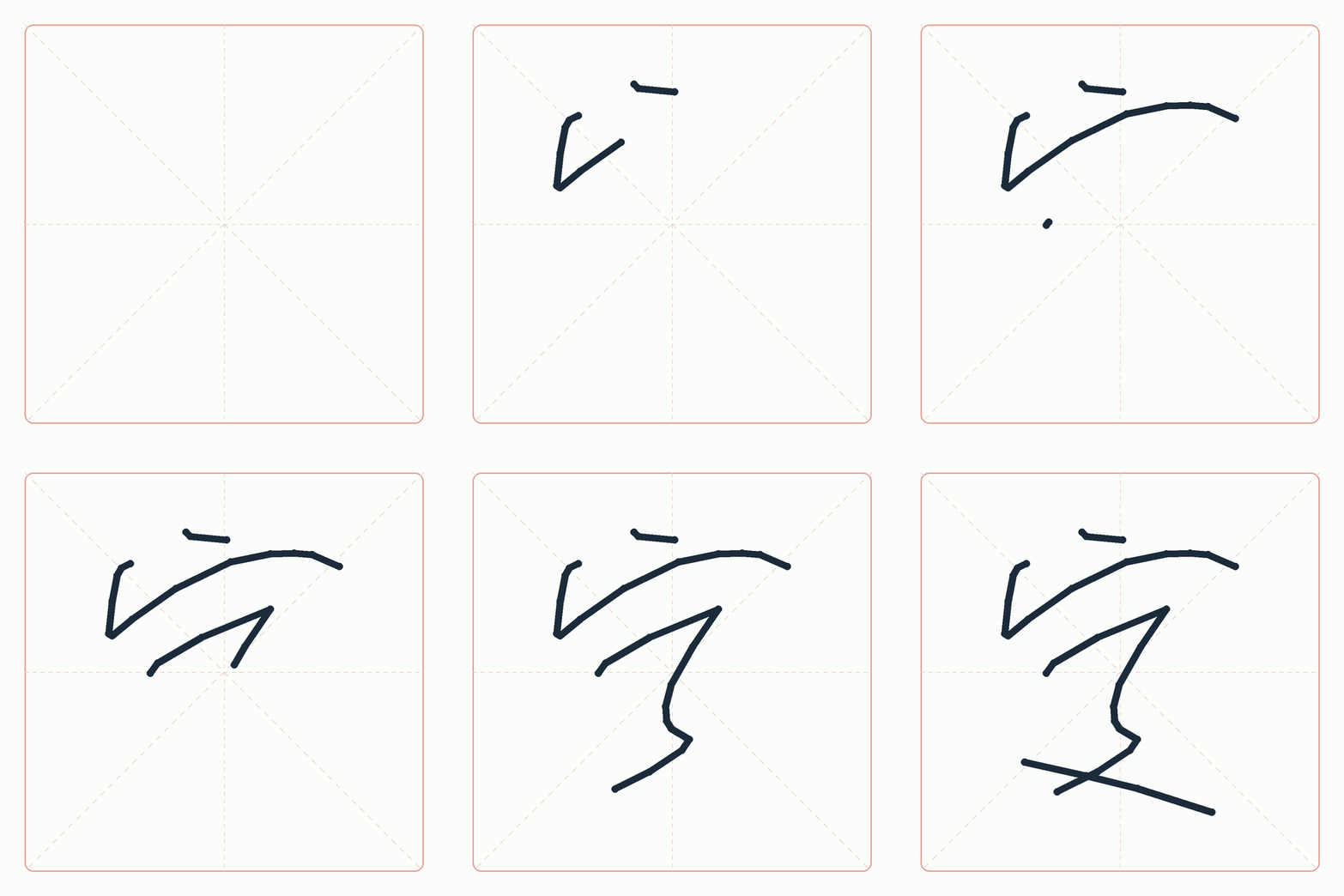
With that feedback in mind, I brought the prototype into Claude Code to continue developing it into an app I could keep using and share with others.
Could it let us write a little more naturally?
I asked Claude about handwriting tools that could accept much more cursive writing (e.g. Pleco Chinese Dictionary), and whether it could build something similar for 写写. One helpful observation was that our app already knew which character the learner was supposed to write. That made the problem more manageable than recognising any character someone might enter.
Claude proceeded to write a custom checker for this "relaxed" writing mode, which looks at the finished character and allows strokes in any order or direction, including joined strokes. I supplied handwriting samples, and we worked through the cases where it rejected writing that looked right to me, or accepted a character before I had finished it.
I could bring a screenshot and ask, “Why doesn't this match?” Claude would investigate the checker and try fixes. I found that quite remarkable, even when I needed help understanding the explanation.
It even made handwriting samples to test with
I was also surprised by how much handwriting test data Claude could create. My own samples covered only a few cases. Claude generated many simulated variations, including distorted strokes, joined-up writing, and characters with a stroke left out. We could then see how a proposed change behaved across a wider set of examples.
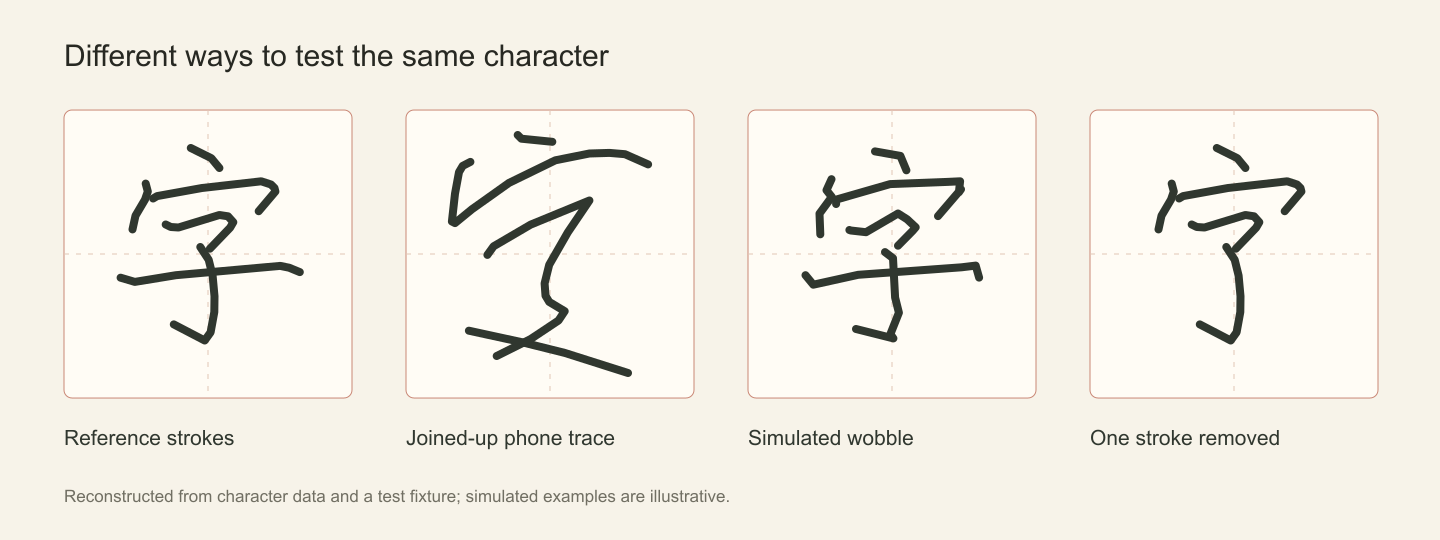
We wanted the app to accept messy handwriting, but still notice when someone had forgotten a stroke. To test that, Claude created joined-up versions of 40 characters, then versions with a stroke missing. We could try a change against both sets and see whether it made the checker more forgiving without also letting unfinished characters pass.
I had expected Opus 5.5 to help write the code. What I didn't expect was how much it could help with creating the "visual" material needed to test that code, running experiments, and revising an approach when the results were poor. Opus 5.5 also knew to use test-driven development by default. That was reassuring when we were adjusting the checker and progress rules: I could focus on the behaviour I wanted without spelling out the testing process each time.
Of course, those samples were still simulated. They helped us investigate particular problems, but I kept coming back to the app and trying it myself. How it felt to write on the pad mattered too.
How forgiving should a practice app be?
I wanted people to feel encouraged to keep practising and able to trust the feedback. Yet, around the same time, I noticed that relaxed mode was giving out 优, or “perfect”, a little too easily. A borderline attempt could pass and get the same reward as a clean one.
That did not feel quite right to me. We tightened what counted as a clean pass and revisited the mastery threshold. I also asked for practice attempts to stay out of mastery statistics, since someone might have just seen the character before writing it.
These were decisions I needed to think through as the person making the app. Claude could explain the consequences and implement the rules, but I still had to decide what “perfect” or “mastered” ought to mean for someone learning with 写写. Using the app myself helped me notice both the frustration of a false rejection and the unease of an undeserved “perfect”. These are not "specs" I could have anticipated upfront.
Making it easier to come back and practise
Alongside the handwriting work, there were all the everyday things that would make 写写 easier to keep using and sharing: syncing progress across devices, better support mobile devices, and installation on a phone as an app.
I liked being able to move between questions about the experience and questions about the implementation. If someone practised on a new device and then signed in, what should happen to the progress they had just made? We could talk through that situation, consider the conflicts, and then work on the code that handled it.
There was also plenty of taking things away from the original protoype. I removed the concept of XP, the tracing option, and some text that made the screens feel busy. With Claude able to add things so readily, I still needed to spend time using the app and deciding what was worth keeping.
I found it refreshing that I did not have to sit down and “make a plan” or “write a spec” before we could get going. I could explain what I wanted, ask a question, or describe something that felt wrong, and we could work from there. As I tried the app, the conversation became more specific.
Its browser use impressed me too. It could open a browser to verify its work, run practice rounds in both modes, and check layouts at different widths. Screenshots gave us something concrete to discuss when wrapping or spacing looked wrong.
Then I wondered if it could make a video
I had seen people online talking about the videos Opus 5.5 could make, and I wanted to try it for myself. So, I attempted to create a promotional video for 写写, built entirely in just HTML using Opus 5.5.
Once again, I was surprised by how far it got. The video used the same handwriting grids, character strokes, cards, and Momo that appeared in the app. The animation ran in a browser page and was then rendered into an MP4. We ended up with a 60fps version with music:
It's interesting to "edit" a video that is made in HTML. I could point to a "timestamp" and ask for edits (e.g. for the card to flip a little more slowly, give the review timeline more space, or stop a jumping card from bumping into the words above it). At one point, I questioned whether a dramatic 3D breakdown of the interface really helped explain the app. With each refinement request, Opus 5.5 just moved alonged, producing version after version for my review.
I went into this wanting to see what the hype about "video generation" was about. What I walked away with is a video I could use to show people the app, and a much broader sense of awe (and fear) of how far these "text-based" and "large language models" have come.
Taking a step back to review the code
After many small changes, I started to wonder whether the code was getting messy. I asked Opus 5.5 to review the app, and it found that much of the complexity had collected in the practice screen. Handwriting checks, grading, timers, and layout behaviour were all being handled together.
We worked through the review bit by bit, moving responsibilities into smaller pieces, removing unused code, and adding tests around the more complicated decisions. Opus 5.5 then tried the practice flows in the browser to check that the refactoring still behaved as expected.
We had also modified Hanzi Writer to make stroke-by-stroke mode more forgiving about where a stroke landed (another user testing feedback), while still checking its order and direction. Those changes went into the library itself, so I asked Claude to keep an original copy and clearly mark our patches. That would make it easier to understand what we had changed and restore the original behaviour if needed.
It was reassuring to be able to ask Claude to look over the code after so many changes, then work through the cleanup together.
I keep thinking about what else I could make for myself
I now have an app shaped around something I wanted for myself. Other people helped make it better, but my own wish to use it was enough to start.
Nowadays, I feel more empowered than ever to make niche software for my own use. There are small things I wish a tool would do, with preferences that might be too particular for an existing product. Trying to build them feels much more feasible now.
I would like to keep building this way: starting with something I wish I had, making an early version, and giving myself room to learn from it. A small tool can be worth making simply because it helps with something I care about.
For now, I have some Chinese handwriting to practise. If yours is a little rusty too, give 写写 a try.